PasserJack help
Connect Warp
Add PasserJack to Warp from Warp Drive, then MCP Servers, then + Add.
Signs in through your browser.
Before you start
- A PasserJack account
- Warp installed
Show the visual walkthrough
Step by step
- In Warp go to Warp Drive, then MCP Servers, then + Add.
- Paste the sign-in block below. Warp takes a bare map of name to server, with no wrapper around it.
- Start the server and approve access in the PasserJack window that opens.
- Already set up in Claude Code or Codex? Warp can read their MCP config too, behind a toggle on that same page.
What to paste
{
  "PasserJack": {
    "url": "https://passerjack.com/api/mcp"
  }
}
Use an API key instead
Open Agents and API keys, choose Warp, then expand Use an API key instead to create your key. These examples carry a placeholder.
- Prefer a key? Open PasserJack, then Settings, then Agents and API keys, choose Warp, expand Use an API key instead, press Create a key and fill this in, and copy the block, then paste that into the same box.
{
  "PasserJack": {
    "url": "https://passerjack.com/api/mcp",
    "headers": {
      "Authorization": "Bearer pj_paste-your-key-here"
    }
  }
}
Preview the PasserJack screens
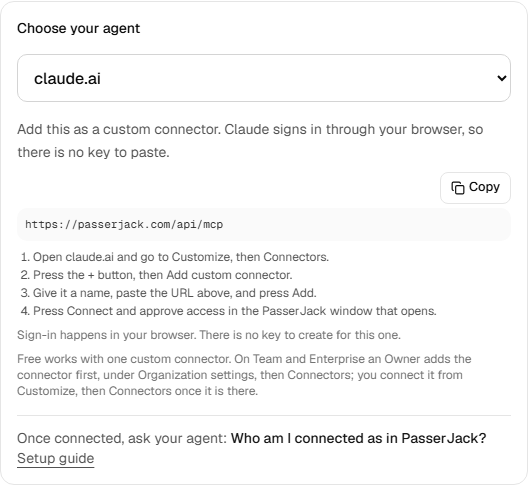
Open Agents and API keys and choose your agent. If you use an API key, each new key is shown exactly once.
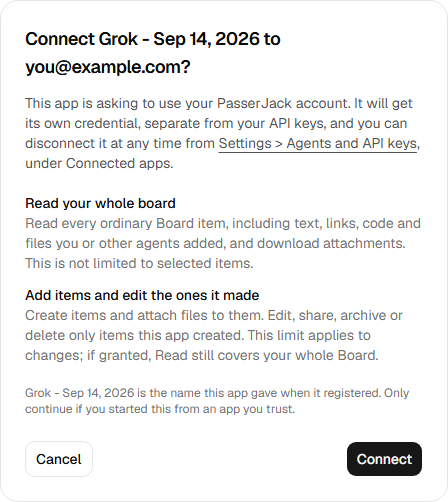
This is the screen a browser sign-in lands on. It names the app that is asking and the permissions it wants, and nothing is granted until you approve it. Read covers your whole ordinary Board, including your attachments. The default edit limit protects items the app did not create from changes; it does not hide them from reads.
Check it worked
Ask the agent: who am I connected as?
A correct answer names your account email, the key or app it is using (for example “Grok - Sep 10, 2026”), and its permissions: read, write if granted, and secrets only if you granted it. If it cannot answer, or names a different account, the connection is not made, so go back through the steps.
Granted write access? Ask it to save a short test note, then confirm that note appears on your board.
Vault reads need both secrets permission and an Unlock for agents window you explicitly open in Vault settings. That permission also includes text and extracted details from sensitive Board images without a Vault window. Review the permission and capture boundaries before granting it.
Manage or disconnect
Open PasserJack, then Settings, then Agents and API keys. That page lists your keys, the apps you have connected and your connector credentials, and you revoke any of them from there.
A revoked key stops working immediately. If a client reports an authentication error, check which account it is signed in to and whether its key was revoked before you create another.